Set up Claude with the GhostCLI Gateway
Use Claude's most capable models in the app and in the terminal, at accessible prices. Watch the video or follow the text — both cover exactly the same steps.
You will need your own key, generated in the dashboard. The keys shown in the videos and images are illustrative: they do not work.
Generate my keyDownload the app
Pick where you want to use it. The same key works for both.

Claude Desktop
App for Windows, macOS and Linux. Graphical interface, no terminal.

Claude Code
Coding agent in the terminal. Reads and edits the files in your project.
Claude Desktop
The app lets you point at a third-party gateway from its own interface, with no config file to edit.
or follow the written steps
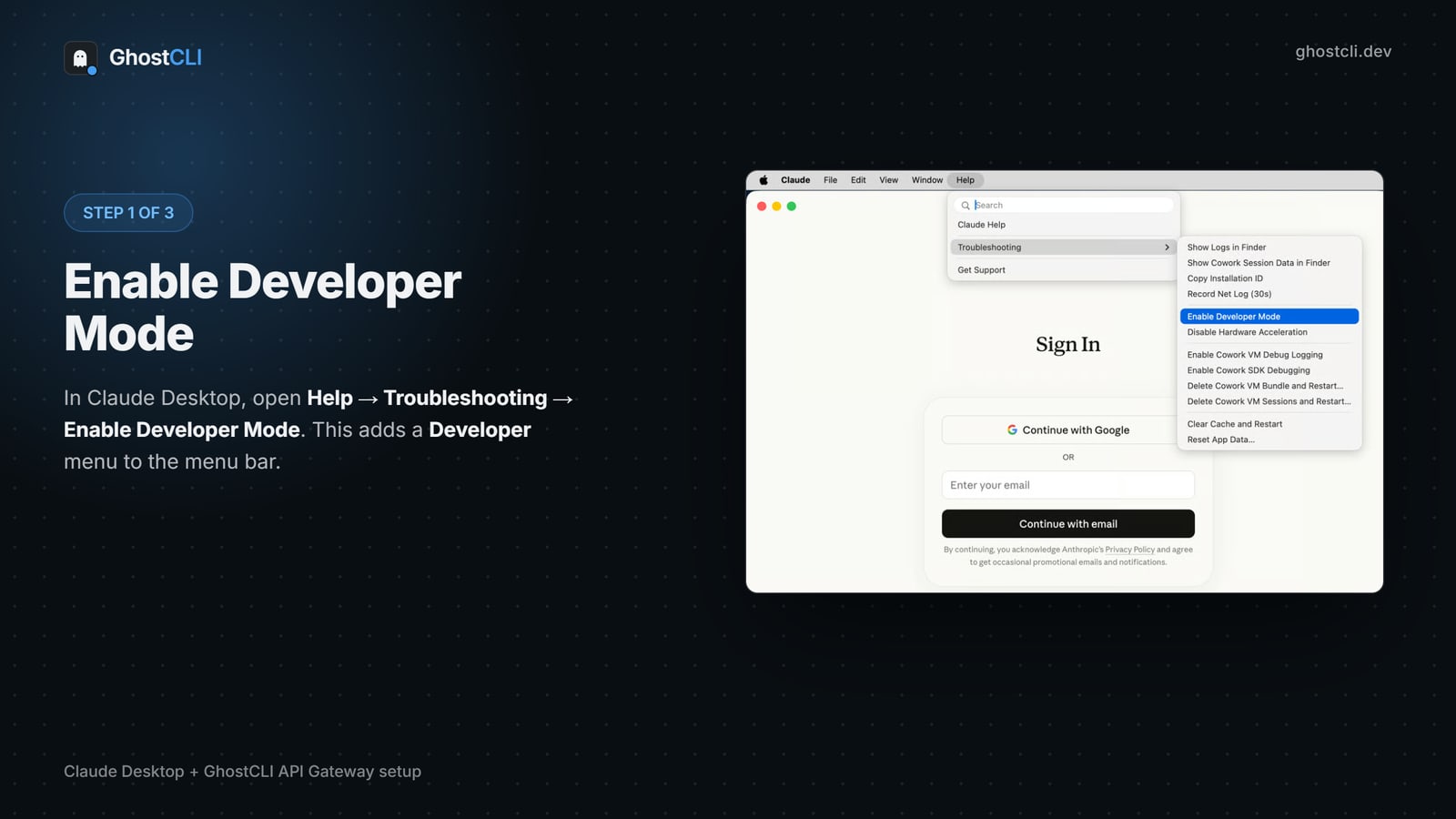
Enable developer mode
Open Claude Desktop and go to Help → Troubleshooting → Enable Developer Mode. Confirm with Apply locally → Relaunch now; the app closes and reopens on its own. Wait for it to come back fully before moving on.
On macOS the Help menu lives in the system bar at the top of the screen.
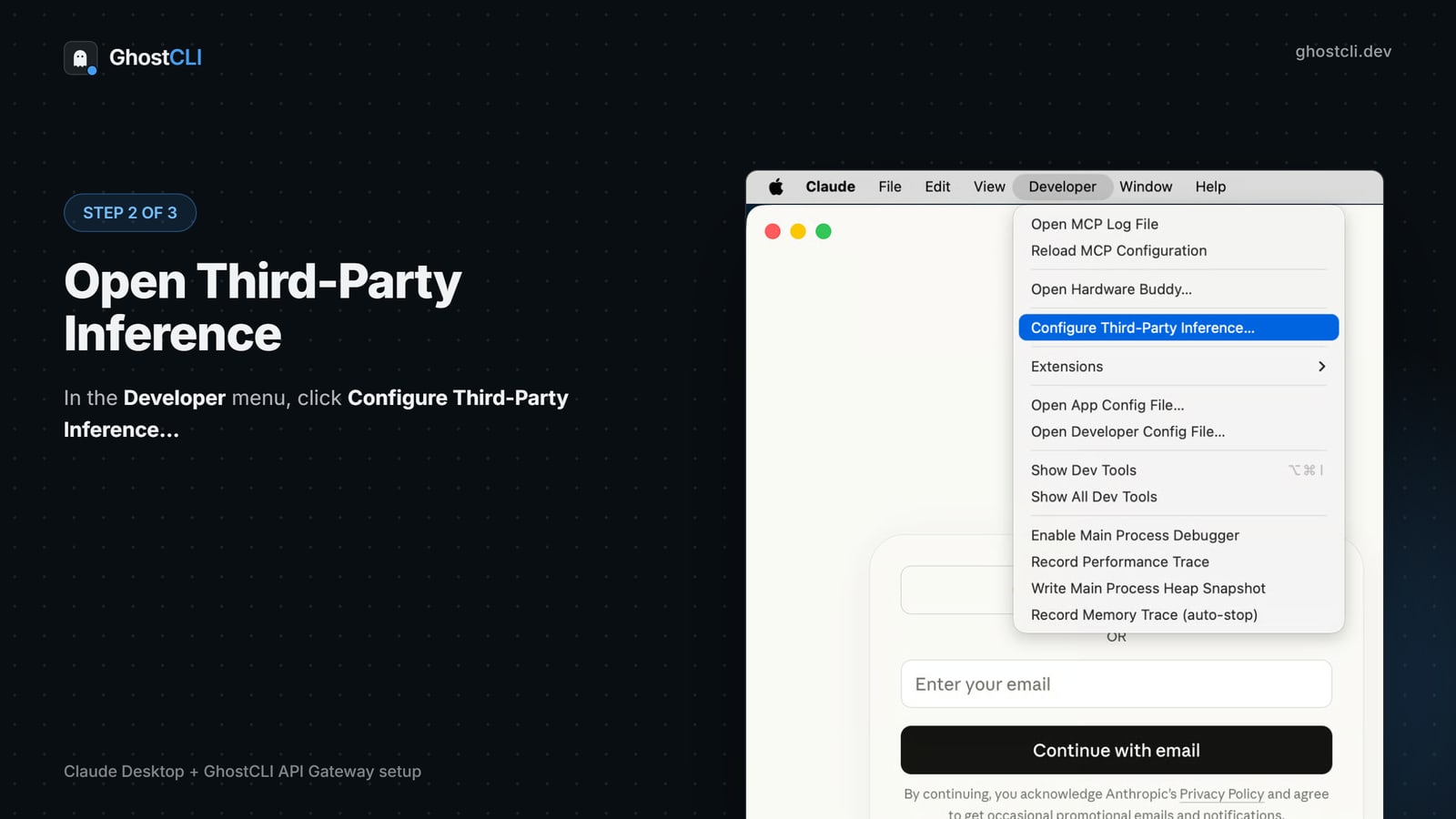
Open third-party inference
With developer mode on, a Developer menu appears in the menu bar. Click it and choose Configure Third-Party Inference…
Can't find the Developer menu? The app did not relaunch after step 1 — close and open it again.
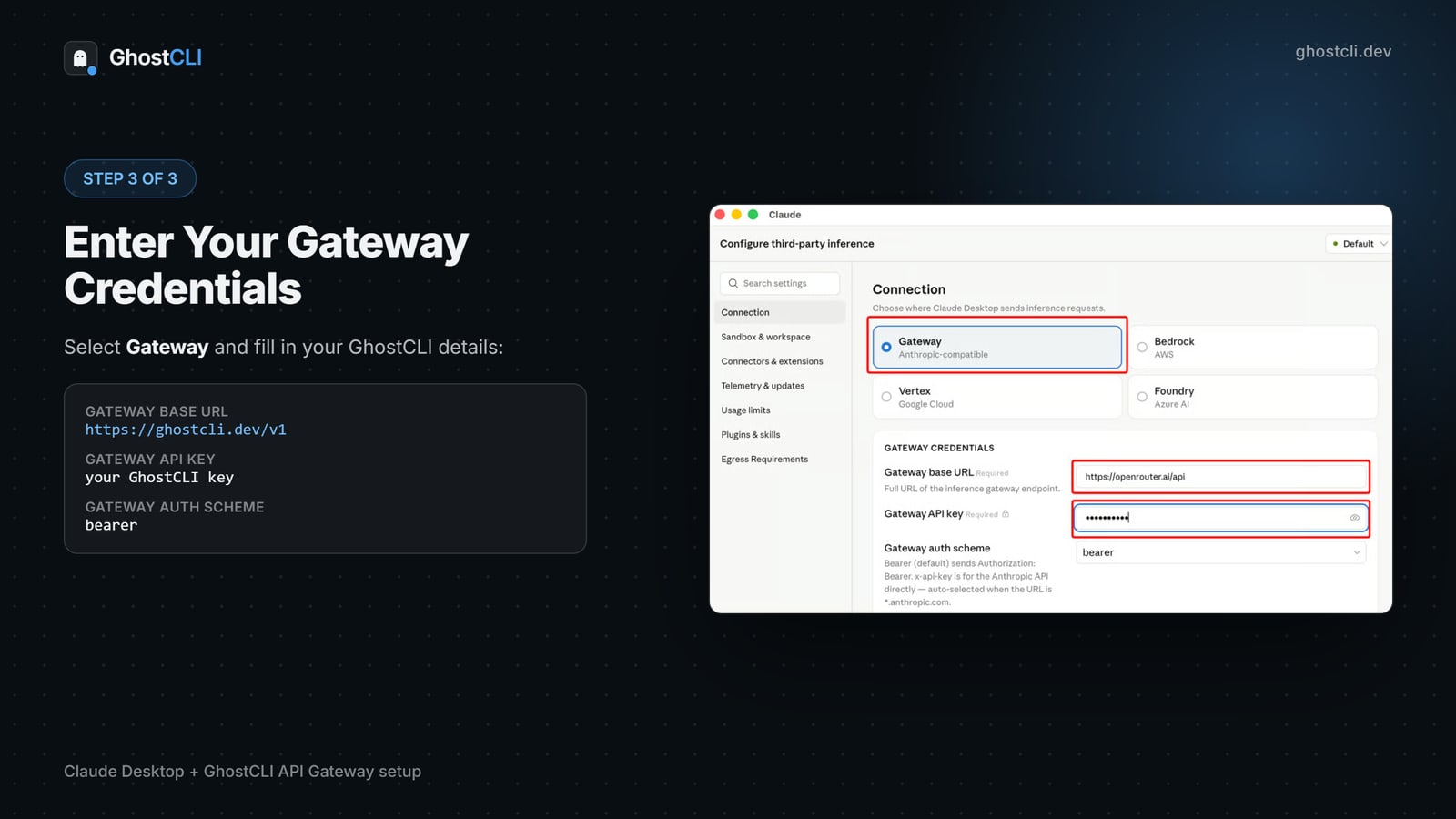
Fill in the credentials
Select Gateway (Anthropic-compatible) and fill in the three fields. Save with Apply and pick the model in the bottom-left corner.
| FIELD | VALUE |
|---|---|
| Gateway base URL | https://ghostcli.dev/v1 |
| Gateway API key | your GhostCLI key |
| Gateway auth scheme | bearer |
Note the URL ends in /v1 here — unlike Claude Code. This field asks for the full endpoint URL, so /v1 is part of it. Swapping the two is the most common mistake.
Claude Code
The CLI is redirected through environment variables. Requires Node.js 18 or newer.
or follow the written steps
Install the CLI
Check Node with node --version and install Claude Code. On Windows, if PowerShell refuses the script, first run Set-ExecutionPolicy -Scope CurrentUser -ExecutionPolicy RemoteSigned.
node --version
irm https://claude.ai/install.ps1 | iex
claude --versionPut it on the PATH
The installer places the executable in ~/.local/bin. If your terminal does not recognise the claude command, that path is not on your PATH.
$claude = "$env:USERPROFILE\.local\bin"
$atual  = [Environment]::GetEnvironmentVariable("Path", "User")
if ($atual -notlike "*$claude*") {
  [Environment]::SetEnvironmentVariable("Path", "$atual;$claude", "User")
}
Close the terminal completely and open a new one for the PATH to take effect.
Point it at GhostCLI
Set the environment variables and run claude. If it asks whether to use the detected key, confirm.
[Environment]::SetEnvironmentVariable("ANTHROPIC_BASE_URL", "https://ghostcli.dev", "User")
[Environment]::SetEnvironmentVariable("ANTHROPIC_API_KEY", "gcli_...", "User")
[Environment]::SetEnvironmentVariable("ANTHROPIC_MODEL", "claude-opus-5", "User")

# feche o PowerShell e abra de novo, depois:
claude
The URL here goes WITHOUT /v1. The CLI appends /v1/messages itself — with /v1 in the variable the request becomes /v1/v1/messages and fails.
Check that it applied
echo $env:ANTHROPIC_BASE_URL
echo $env:ANTHROPIC_API_KEYSwitch models later
Inside Claude Code, type /model followed by the name. Outside it, use claude config set model.
/model claude-opus-5
/model claude-fable-5.1
/model z-ai/glm-5.3
If you have signed in with a Claude Pro, Max or Team account in this terminal, the variables take precedence over the subscription. To go back to the account, clear the three variables and start claude again.
Codex + Claude
Claude in Codex, step by step
Prepare API access
In the dashboard, check your plan, activate the API add-on, create your key and authorize your IP using the email code. This authorizes its provider network (ASN), so IP changes within the same ASN do not require another approval. A chat subscription alone does not enable API access.
Open the Codex configuration
Use ~/.codex/config.toml on macOS/Linux or %USERPROFILE%\.codex\config.toml on Windows. Create the directory and file if missing. Back up existing settings; merge the example without duplicating entries. If CODEX_HOME is customized, use its config.toml.
Select GhostCLI and a Claude model
Put model and model_provider at the top, before any [table]. The provider name must match [model_providers.ghostcli]. GhostCLI translates the Responses API used by Codex to the selected model. This does not make Claude an OpenAI model.
Set your key and start a new session
Copy the environment command from the generator. For permanent Windows variables, open a new terminal. Start codex in your project. Use /status to inspect the selected model; try a simple prompt before a larger task.
Use the exact model ID from the catalog. Model availability follows your plan. Keep /v1 in the Codex URL and wire_api = "responses". Do not use the Anthropic /v1/messages endpoint in Codex.
model = "claude-sonnet-5"
model_provider = "ghostcli"

[model_providers.ghostcli]
name = "GhostCLI"
base_url = "https://ghostcli.dev/v1"
env_key = "GHOSTCLI_API_KEY"
wire_api = "responses"
If something does not work
The terminal does not recognise the claude command
The PATH was not applied. Close every terminal window and open a new one — an environment variable only reaches processes started after it.
401 error or "invalid API key"
The key is wrong, revoked, or the IP is not allowed. Check the dashboard and generate a new one if needed.
404 error on requests
Almost always the /v1 in the wrong place: Claude Code goes without it, Claude Desktop goes with it.
The model replies, but not the one I picked
In Desktop the picker is in the bottom-left corner. In Code, use /model inside the session.
 Still stuck? Talk to us on Discord